Switch 2 Game-Key Cards Explained: Physical, Digital and Virtual Game Cards
Full cartridges, game-key cards, digital downloads and virtual game cards on Switch 2: what each format means for internet, storage, lending and resale.
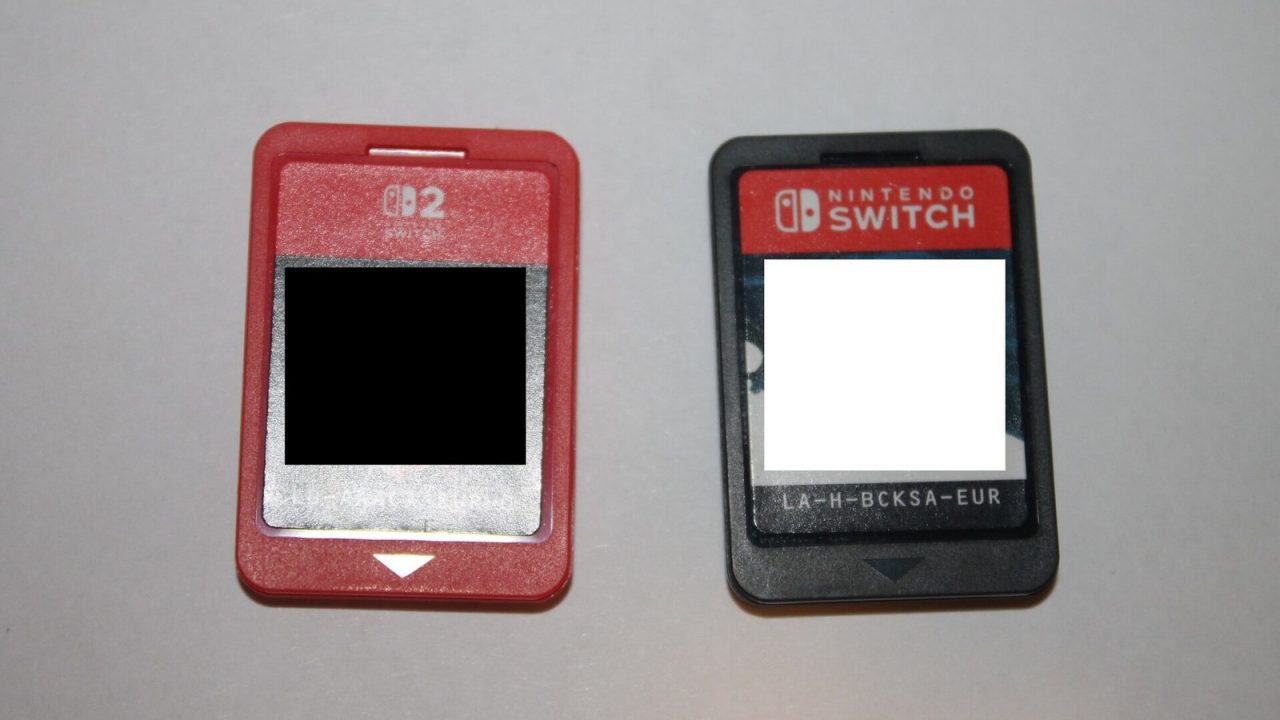
Buying a game used to be simple on Nintendo hardware: either you bought a cartridge and put it in the slot, or you bought a download from the eShop. Switch 2 complicates that picture. A box on a store shelf might contain a full game cartridge, a card that only unlocks a download, or a download code with no card at all. And once you own a digital game, Nintendo’s virtual game card system changes how you move it between consoles and share it with family.
This guide explains each format in plain terms, based on Nintendo’s official Switch 2 FAQ and virtual game card pages as of October 2026, and then looks at the practical consequences for internet access, storage, lending and resale.
The Four Ways to Own a Switch 2 Game
Before getting into details, here is the short version.
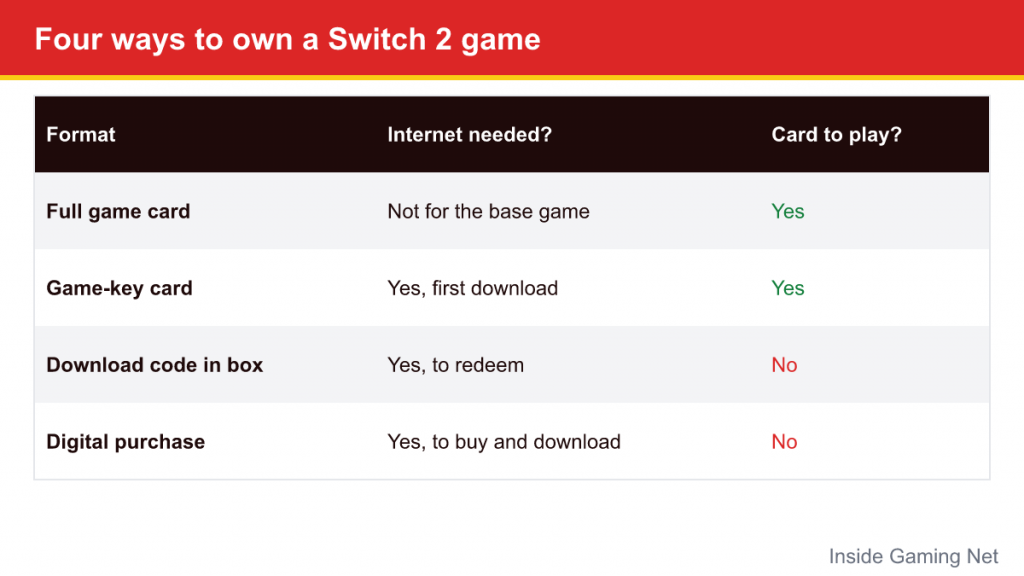
| Format | What you get | Internet needed? | Card needed to play? |
|---|---|---|---|
| Full game card | A cartridge with the game data on it | Not to play the base game | Yes |
| Game-key card | A cartridge that holds a “key,” not the game | Yes, for the first download on each system | Yes |
| Download code in a box | A code redeemed on your Nintendo Account | Yes, to redeem and download | No (it becomes a digital game) |
| Digital purchase | A license on your Nintendo Account, managed as a virtual game card | Yes, to buy and download; also the first launch after loading | No |
The labels on store shelves matter, so it helps to know which of these you are holding before you pay. If you are still deciding on hardware, our Switch vs Switch 2 comparison covers the systems themselves.
Full Game Cards: The Traditional Cartridge
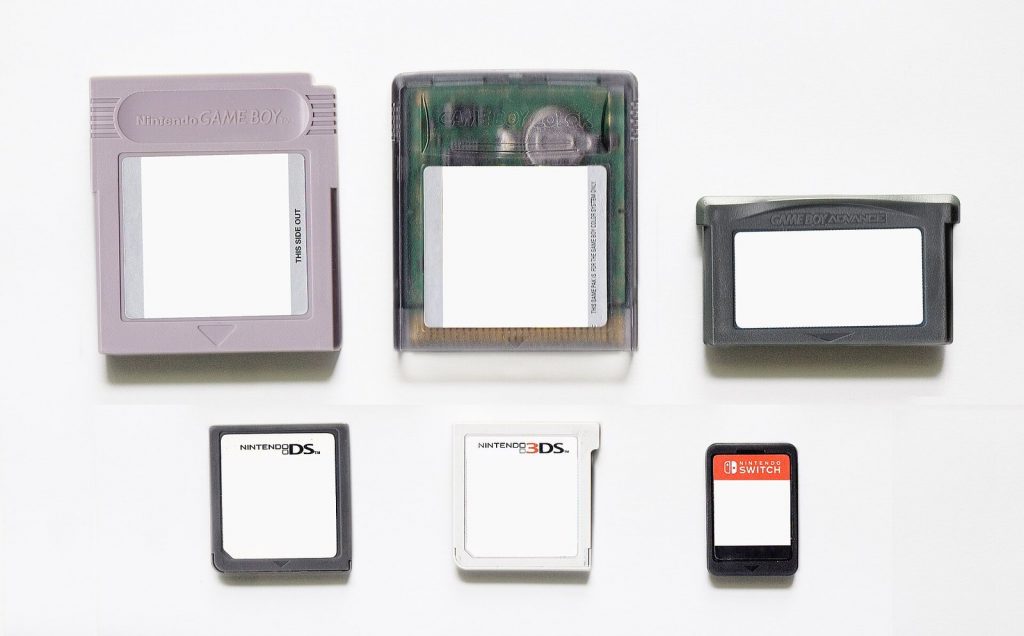
A full game card works the way Switch cartridges always have. The game data lives on the card itself. Insert it, and the game runs. You can play without an internet connection, take the cartridge to a friend’s house, or sell it when you are done.
A few modern caveats still apply. Day-one patches and later updates are downloaded separately and stored on the console, so a cartridge does not guarantee you are playing the latest version without going online. Downloadable content is also separate from the cartridge. Nintendo’s FAQ notes that for physical games, DLC is managed as its own virtual game card and requires the main game to play.
Switch 2 Edition games deserve a mention here. According to Nintendo, physical versions of Nintendo Switch 2 Edition games include both the original Nintendo Switch game and its upgrade pack. Put that cartridge in an original Switch and the Switch version plays, but the Switch 2 Edition features do not.
The Switch 2 also has a slot that accepts original Switch cartridges, which means most existing physical collections carry over. Compatibility for individual titles is something Nintendo tracks separately, so check before assuming a specific older game behaves perfectly.
Game-Key Cards: The Key, Not the Game
Game-key cards are the format that caused the most confusion when Switch 2 was announced. Nintendo’s own FAQ describes a game-key card as a card that “does not contain any game data, but only includes the ‘key’ required to start the game.” The physical card is real, it goes in the cartridge slot, and it is needed every time you play, but the game itself has to be downloaded.
How a game-key card works, step by step
- Insert the game-key card into your Switch 2.
- The system downloads the game data over the internet to internal storage or a microSD Express card.
- After the download, you start the game with the card inserted, just as you would with a full cartridge.
- Whenever you want to play later, the card must be in the slot.
What Nintendo says about the details
- Internet: You need an internet connection and enough free space for the first download.
- Storage: The required amount of free space is printed on the game-key card packaging. You can check how much space you have under System Settings, then Data Management.
- Other consoles: A game-key card works on any Switch 2, but the first time you use it on a different system, that system has to connect to the internet and download the data.
- Nintendo Account: Nintendo states that a Nintendo Account is not needed to download the game data.
- Saves: As with other software, save data is stored on the system, not on the card.
In practice, that means the card itself, not your account, carries the right to play.
Why game-key cards exist
Nintendo president Shuntaro Furukawa linked the format to file sizes in comments to shareholders: many Switch 2 games are large, and game-key cards give publishers a way to sell those games in physical form at retail. Whether a game ships on a full card or a game-key card is a publisher decision, which is why you will see both on the same shelf.
Download Codes in a Box
A third physical-looking option is easy to mix up with the other two. Nintendo’s FAQ notes that some publishers sell Switch 2 Edition games as download codes in physical packaging, with no game card inside. Once you redeem the code on your Nintendo Account, the game is simply a digital purchase. There is no cartridge to lend or sell, and the box is effectively a gift-card-style wrapper.
The practical advice is to read the packaging carefully. If you want something you can lend or resell, a download code does not offer that. If you are buying as a gift and the recipient prefers digital anyway, it makes no difference.
Digital Games and Virtual Game Cards
Digital games are bought on the Nintendo eShop and tied to your Nintendo Account. Since 2025, Nintendo has organized digital libraries on both Switch and Switch 2 as virtual game cards. The idea is to make digital games behave a little more like cartridges: each game is a card you can “load” onto a console and “eject” from it.
Loading and ejecting
From the HOME Menu, open Virtual Game Cards, pick a game from your library and load it. After the data downloads, the game is ready. According to Nintendo:
- The first time you start a loaded game, you need an internet connection. After that, it can be played offline.
- Every user account on that system can play a loaded virtual game card.
- To move a game to your other console, you eject it from one system and load it on the other. Ejecting requires an internet connection.
- Virtual game cards can also be managed through your Nintendo Account on Nintendo’s website.
The two-system limit
Each Nintendo Account can link up to two systems for virtual game cards. Linking needs local wireless and an internet connection, but only the first time; after that, the two systems do not need to be near each other to swap games. The same game cannot run on both linked systems at once. Unlinking a system removes all virtual game cards loaded on it.
Two other rules are worth knowing. Nintendo Switch 2 exclusive games and Switch 2 Edition games can only be loaded on a Switch 2, so they cannot move to an original Switch. And for digital games, DLC is managed together with the main game’s virtual game card, so it follows the game when you load it elsewhere.
Nintendo also offers a separate “online license” setting, which lets you play digital games on three or more systems without loading virtual game cards, as long as the system can complete an online check when you start the game.
Lending to family
Virtual game cards can be lent to members of your Nintendo Account family group. Nintendo’s rules, as of October 2026:
- Each account can lend one game at a time, for up to 14 days.
- Lending happens over local wireless between the two systems, and both need to be online.
- The borrower can return the game early, and their save data stays on their system after it returns.
- Games available only through a Nintendo Switch Online membership cannot be lent, and virtual game cards may not be available for demos.
Family groups, child accounts and supervised play add their own layer of settings. If you are managing a child’s console, start with our parental controls setup guide.
What This Means for Lending, Resale and Offline Play
The differences between formats are clearest when you look at specific situations.
You want to sell or trade the game later
Full game cards and game-key cards are both physical items that can change hands. Nintendo says a game-key card works on any Switch 2, but the new owner will need internet access and free storage for the download. Digital purchases and redeemed download codes cannot be resold.
You often play without internet
A full game card is the most self-contained option. Game-key cards and digital games both need an internet connection at least once per system before you can play, so download them at home before travelling. After that, both can be played offline: game-key cards with the card inserted, and virtual game cards once loaded and started for the first time.
You have limited storage
Full game cards run from the cartridge, so the game itself does not need to be installed, although updates and save data still use system storage. Game-key cards and digital games both require the full game data on your internal storage or a microSD Express card. If your storage is tight, check the free space requirement printed on game-key card packaging before buying.
You share games within a household
Physical cards are easy to pass around a home, but only one person can use a card at a time. Virtual game cards allow moving digital games between two linked systems and lending one game at a time to family group members. For households with several consoles, the right mix depends on which games each person plays.
You are thinking about the long term
A full game card contains the game and does not depend on any download service to work. A game-key card depends on the game data being available to download whenever it is used on a new system. Digital purchases depend on your Nintendo Account and Nintendo’s services. Collectors and players who value long-term access often prefer full cartridges where the choice exists.
Quick Answers to Common Questions
Is a game-key card a digital game? Not exactly. The game data is downloaded like a digital game, but the right to play sits on the physical card, which must be inserted to play.
Can I play a game-key card game without the card if it is already downloaded? No. Nintendo states the card must be in the system when you want to play.
Do I need a Nintendo Account for a game-key card? According to Nintendo’s FAQ, not to download the game data.
Can I put a digital Switch 2 game on my original Switch? Not if it is a Switch 2 exclusive or a Switch 2 Edition; those can only be loaded on a Switch 2.
For more on the console itself, including storage and controller basics, see Nintendo Switch 2 explained.