Switch vs Switch 2: Every Key Difference That Matters
Original Switch, Switch Lite, Switch OLED or Switch 2? Screens, power, controllers, storage, docks and game compatibility compared side by side.
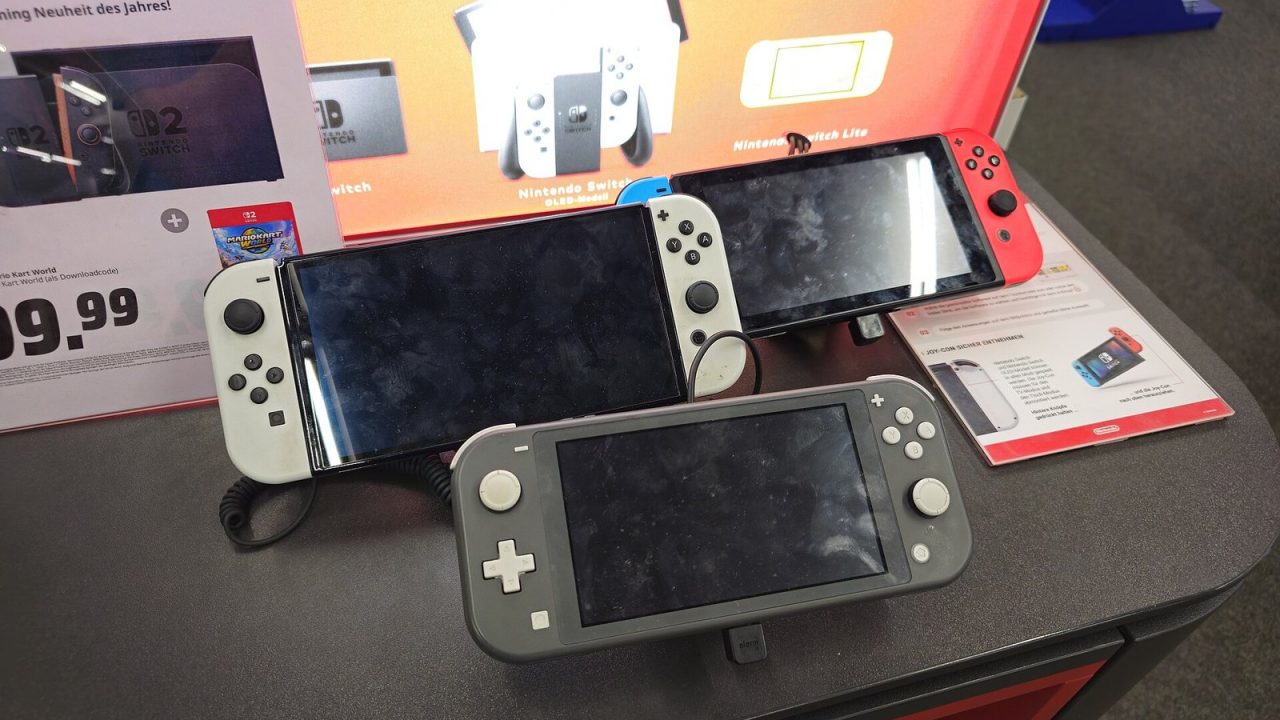
Nintendo now sells and supports two generations of Switch hardware at the same time, and the original generation itself came in three different models. If you are buying a console for yourself or a child, inheriting a used one or deciding whether to upgrade, the names alone do not tell you much. “Switch,” “Switch Lite,” “Switch OLED” and “Switch 2” sound similar but behave quite differently in daily use. This guide lines them up feature by feature and finishes with a practical look at who should pick which.
The Four Models at a Glance
The original Nintendo Switch launched on March 3, 2017. Nintendo later added the Switch Lite (September 20, 2019), a smaller handheld-only version, and the Switch OLED Model (October 8, 2021), which kept the hybrid design but added a bigger, more vibrant screen. The Switch 2 followed on June 5, 2025, as a new generation with far more power.
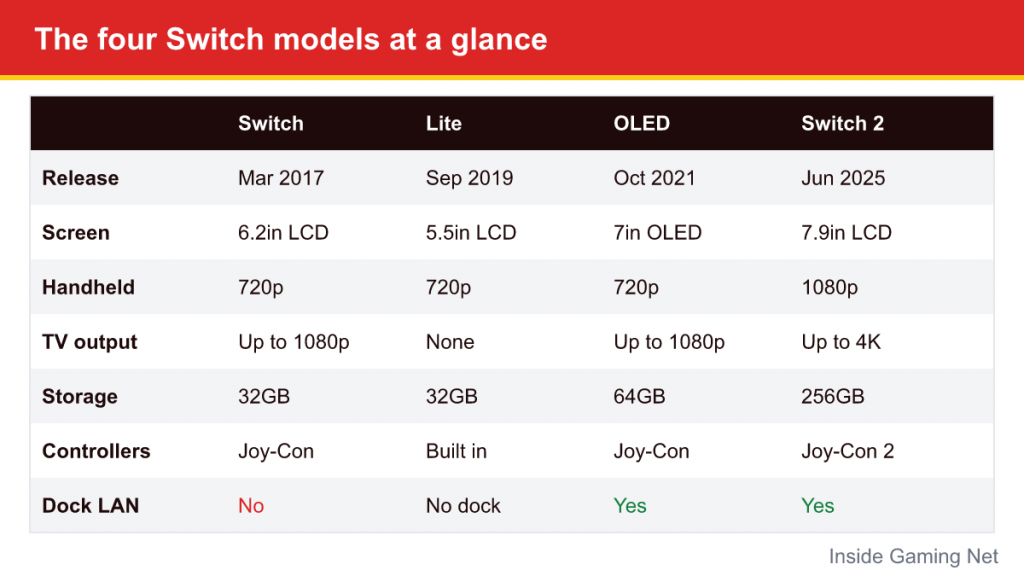
| Feature | Switch (original) | Switch Lite | Switch OLED | Switch 2 |
|---|---|---|---|---|
| Release | March 2017 | September 2019 | October 2021 | June 2025 |
| Screen | 6.2-inch LCD | 5.5-inch LCD | 7-inch OLED | 7.9-inch LCD, HDR |
| Handheld resolution | 720p | 720p | 720p | 1080p, up to 120Hz |
| TV output | Up to 1080p | None | Up to 1080p | Up to 4K (60fps) or 1440p/1080p (up to 120fps) |
| Internal storage | 32GB | 32GB | 64GB | 256GB |
| Card expansion | microSD (SDHC/SDXC) | microSD (SDHC/SDXC) | microSD (SDHC/SDXC) | microSD Express only for games |
| Detachable controllers | Yes (Joy-Con, rails) | No | Yes (Joy-Con, rails) | Yes (Joy-Con 2, magnetic) |
| Dock LAN port | No (adapter needed) | No dock | Yes | Yes |
The rest of this article explains what those numbers mean when you actually sit down to play.
Screens: Size, Sharpness and Color
Every original Switch model shares the same handheld resolution of 1280 x 720. The differences are size and panel technology. The Lite’s 5.5-inch screen makes the image dense and sharp but small text can be harder to read. The original 6.2-inch LCD is a middle ground. The OLED Model’s 7-inch OLED panel is the standout of the first generation: blacks are truly black, colors are punchier and the thinner bezels make it feel larger than the numbers suggest.
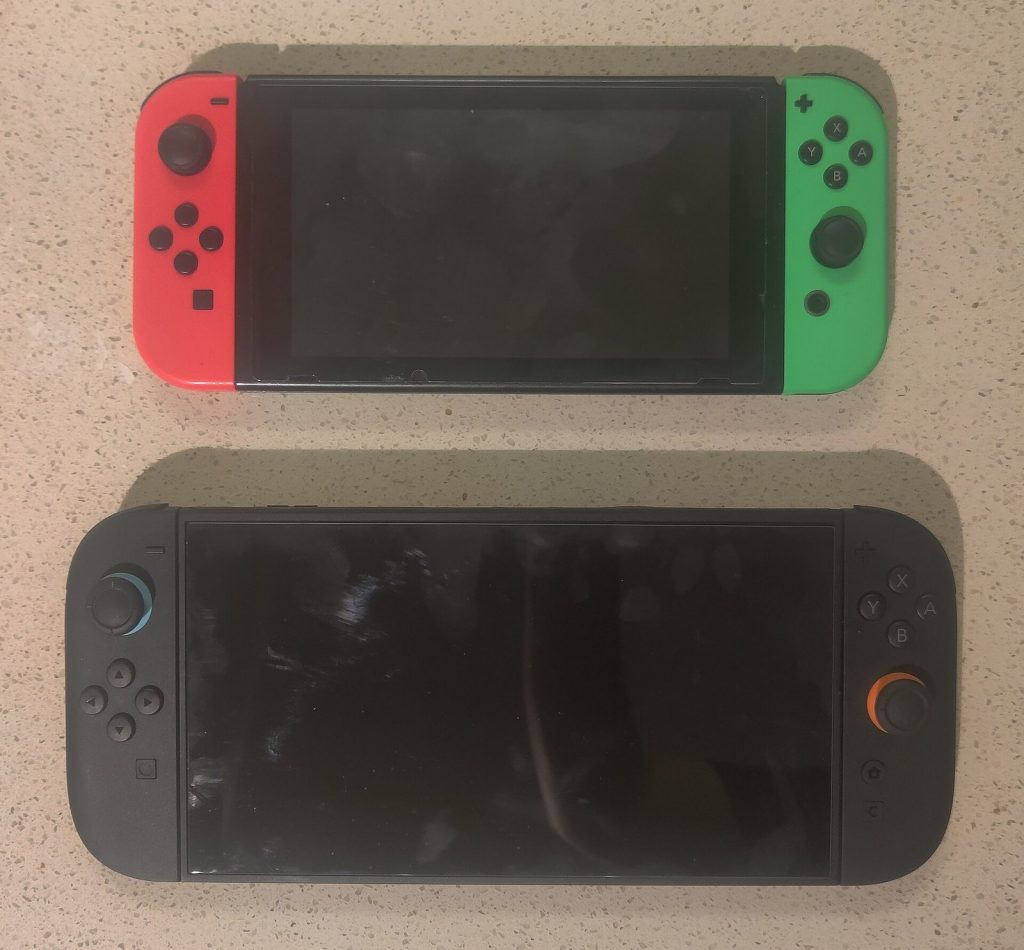
The Switch 2 changes the conversation. Its 7.9-inch screen is the largest of any Switch, and at 1080p it has more than twice the pixels of the earlier models. It also supports HDR and a variable refresh rate of up to 120Hz, so games that target higher frame rates look visibly smoother. The trade-off is that it uses an LCD rather than OLED, so deep blacks are not quite as inky as on the OLED Model. For most players, the extra resolution and size matter more, but if you mainly play older Switch games handheld and love the look of OLED, the comparison is closer than the specification sheet suggests.
Performance: Why Switch 2 Feels Like a New Generation
All three original models use essentially the same processing hardware, so a game runs at broadly the same speed on the Switch, Lite and OLED. That hardware was modest even in 2017, and in later years many ambitious games ran with lower resolutions or uneven frame rates.
The Switch 2 uses a new custom Nvidia processor with 12GB of memory, a large jump over the 4GB in the original models. In practice that brings three benefits:
- New games that could not exist on Switch, such as Mario Kart World and Donkey Kong Bananza, which are Switch 2 exclusives.
- Better versions of existing games, through free updates or paid Nintendo Switch 2 Edition upgrades that raise resolution and frame rates.
- Faster loading thanks to quicker internal storage.
Even unmodified original Switch games often run a little more consistently on Switch 2, although Nintendo is careful to say that most of them simply behave as they did on the original console.
Controllers: Joy-Con vs Joy-Con 2
The original Joy-Con slide onto metal rails on the sides of the console. They include motion controls, HD Rumble and, on the right controller, an infrared camera that a handful of games used. They are also small, which suits children’s hands but can be cramped for adults.
The Switch Lite has its controls built into the body. You cannot detach them, so sharing a two-player game on one Lite requires separately purchased wireless controllers, and the system cannot be docked to a TV.
Joy-Con 2 are larger and attach magnetically, snapping onto the console’s sides and releasing with a button on the back. They add a mouse mode, in which the controller slides on a flat surface like a computer mouse, and the right Joy-Con 2 has a new C button that opens GameChat. Original Joy-Con can pair wirelessly with a Switch 2 for many games, but they cannot attach to it. Joy-Con 2 do not work with original Switch consoles. For a fuller introduction to these features, see our Switch 2 explainer.
Storage: Internal Space and Memory Cards
Storage is where the generations diverge most sharply in day-to-day ownership.
The original Switch and Lite include 32GB of internal storage and the OLED Model 64GB. Those numbers fill up quickly, so most owners add a standard microSD card. Nearly any microSDHC or microSDXC card works, and they are widely available.
The Switch 2 starts with 256GB, which goes much further. For expansion, though, it only installs and runs games from microSD Express cards, a faster standard. Your old microSD card will still be readable, but on Switch 2 it can only hold screenshots and video captures. If you plan to carry a large digital library, budget for a microSD Express card or be prepared to archive games you are not playing.
Docks and TV Play
The original Switch dock outputs up to 1080p and has USB ports but no wired network port, so a USB-to-Ethernet adapter is needed for wired internet. The OLED Model’s dock replaced one USB port with a built-in LAN port. The Lite has no dock at all because it cannot output to a TV.
The Switch 2 dock supports 4K output at up to 60 frames per second and 1440p or 1080p at up to 120 frames per second in supported games, with HDR. It includes a LAN port and a built-in fan that keeps the dock itself cool. Older Switch docks are not designed for Switch 2, and the Switch 2 dock is meant for the Switch 2 console, so treat each console and its dock as a pair.
Game Compatibility in Both Directions
This is the most important practical difference for families with mixed hardware.
- Switch games on Switch 2: Most work, both cartridges and digital purchases. A small number of titles that depend on original Joy-Con features need those controllers, and a few, such as the Nintendo Labo VR Kit, are not compatible.
- Switch 2 games on Switch: They do not work. Switch 2 game cards and Switch 2-exclusive digital games require the new console.
- Switch 2 Edition games: These are enhanced versions of Switch games, such as Kirby and the Forgotten Land and the two open-air Zelda games. They only run in their enhanced form on Switch 2.
- Online play between generations: Many games that exist on both systems let Switch and Switch 2 owners play together, but this depends on each game.
There is also a format consideration. Many Switch 2 physical releases are Game-Key Cards, which hold a license rather than the full game and download the data when inserted. Original Switch cartridges almost always contain the whole game.
Portability, Comfort and Battery
The Lite is the clear winner for portability. It is small, light and fits in a jacket pocket more easily than any other model. Its battery is rated at roughly 3 to 7 hours depending on the game. The original Switch’s later revision and the OLED Model are rated at roughly 4.5 to 9 hours, while the very first 2017 units manage less.
The Switch 2 is the largest and heaviest, at about 534 grams with Joy-Con 2 attached, and Nintendo’s estimate for battery life is about 2 to 6.5 hours. That is a meaningful step down in endurance, particularly with demanding new games, so a portable USB-C power bank is a sensible accessory for long trips.
Who Should Pick Which
Pick a Switch 2 if…
You want to play new Nintendo releases, which increasingly target Switch 2 only; you want sharper visuals on a TV; or you are buying one main console for a household that will be used for years. It plays most of the original library too, so you are not giving anything up there.
Pick a Switch OLED if…
You already own a strong library of original Switch games, mostly play handheld, and value the OLED screen. It remains a good console for the existing library, but it cannot run Switch 2 exclusives.
Pick a Switch Lite if…
The console is for a younger child who will play alone and on the go, or as a second system in a household. It is the most durable-feeling and portable option, but remember it has no TV mode and its controls cannot be detached for sharing.
Keep your original Switch if…
It still does what you need. There is no penalty for staying put until a Switch 2-only game you care about arrives, and the original library is large enough to keep most players busy for a long time.
Common Mistakes When Choosing
- Assuming a Lite can play on the TV. It cannot, and no adapter changes that.
- Reusing an old microSD card for Switch 2 games. It will only store screenshots and videos.
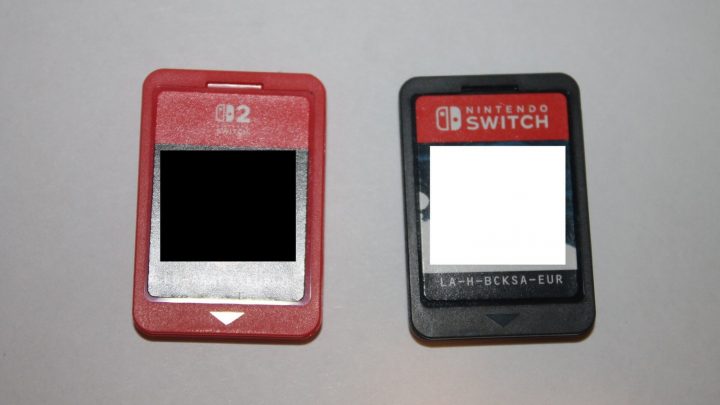
- Buying a Switch 2 game for an original Switch. Check the box: Switch 2 cartridges are a different color (red) and labelled for Nintendo Switch 2.
- Ignoring Game-Key Cards. If you need to play offline after buying, check whether the game card contains the full game.